Walk. Earn. Use.
A daily reason to open VerifyU. Walking keeps you moving — and it keeps the profile that matters in an emergency current, checked and ready. Eligible days earn VerifyU Coins you can put towards everyday recharges.
From a daily walk
to a real recharge.
The loop is deliberately small. Reach the daily step goal, earn coins on eligible days, and put them towards bills you already pay.
Reach the daily walking goal with the Steps tracker in the app.
An eligible day at 10,000 steps earns 5 VerifyU Coins under the current offer.
Apply eligible coins to recharges and eligible offers in Recharge & Utilities.

VerifyU Coins are an in-app reward. They have no cash value, cannot be exchanged for money and are not a currency, token or investment. Goals, coin values and eligible categories are current offers and can change.
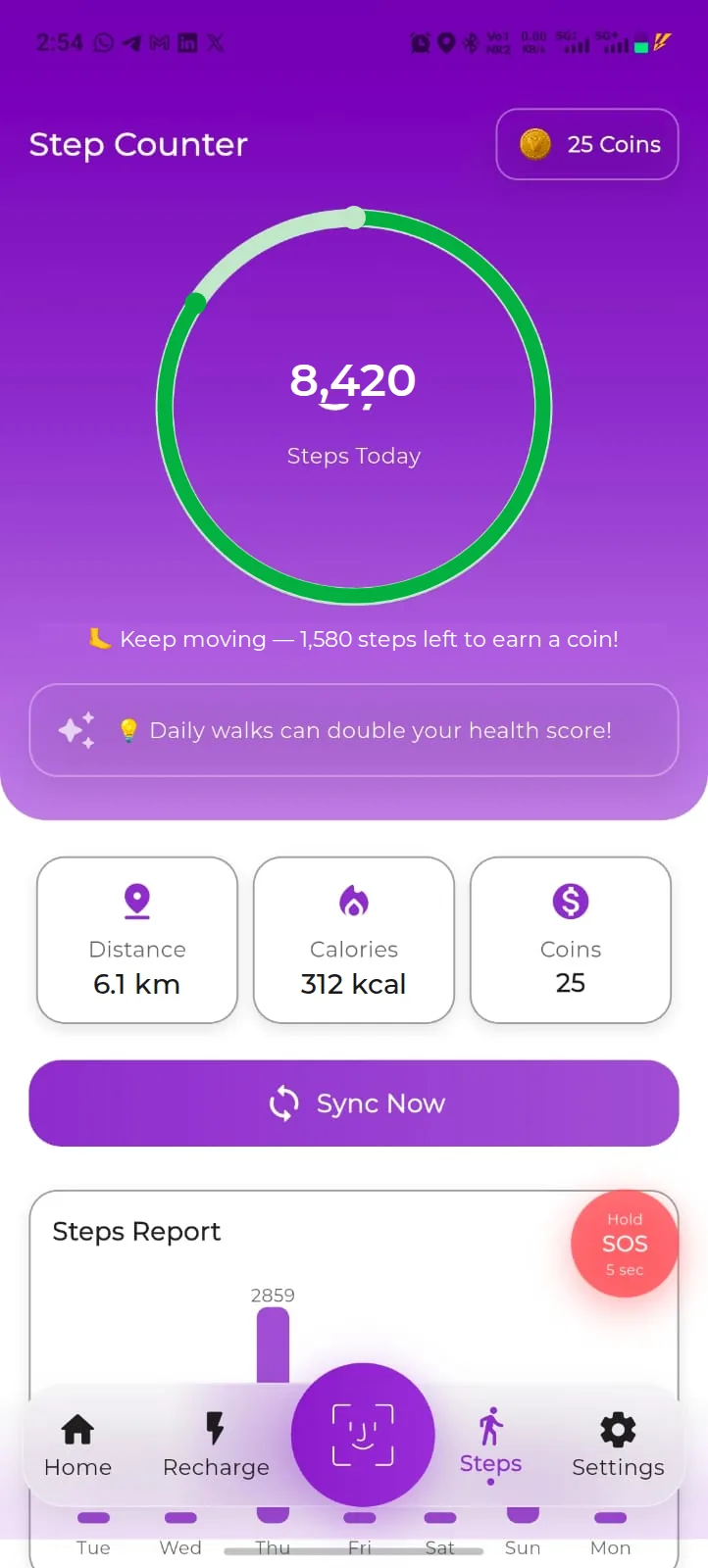
The Step Counter in the app, shown with demo data.
Your steps, counted in the app.
The Step Counter is where the day is counted. It is the only place a day becomes eligible.
- Steps today. A ring shows the day’s count and how many steps are left to earn a coin, with distance, calories and your coin balance underneath.
- Sync Now. Tap Sync Now to bring the latest step count into VerifyU before the day ends.
- Steps Report. A weekly chart shows the last seven days, so a missed sync is easy to spot.
- Permissions. Step tracking depends on the activity and fitness permissions you allow on your phone, and on the app being able to read that data. Owner verification
If permissions are switched off, or a day never syncs, that day may not be counted as eligible.
See what was actually credited.
Steps on the tracker are progress. Coins are what has been credited to your balance — and the app shows both.
- Check credited coins. Your balance travels with you: it sits on the Step Counter, in Settings beside Referral Rewards, and at payment in Recharge & Utilities.
- Progress is not a confirmed reward. A step count on the tracker does not mean coins have been credited. Only credited coins can be used.
- Offers change. The rule that applies today is the one shown in the app, not the one you remember from last month.
If a day looks missing, check that it synced before the day ended, then contact support with the date.
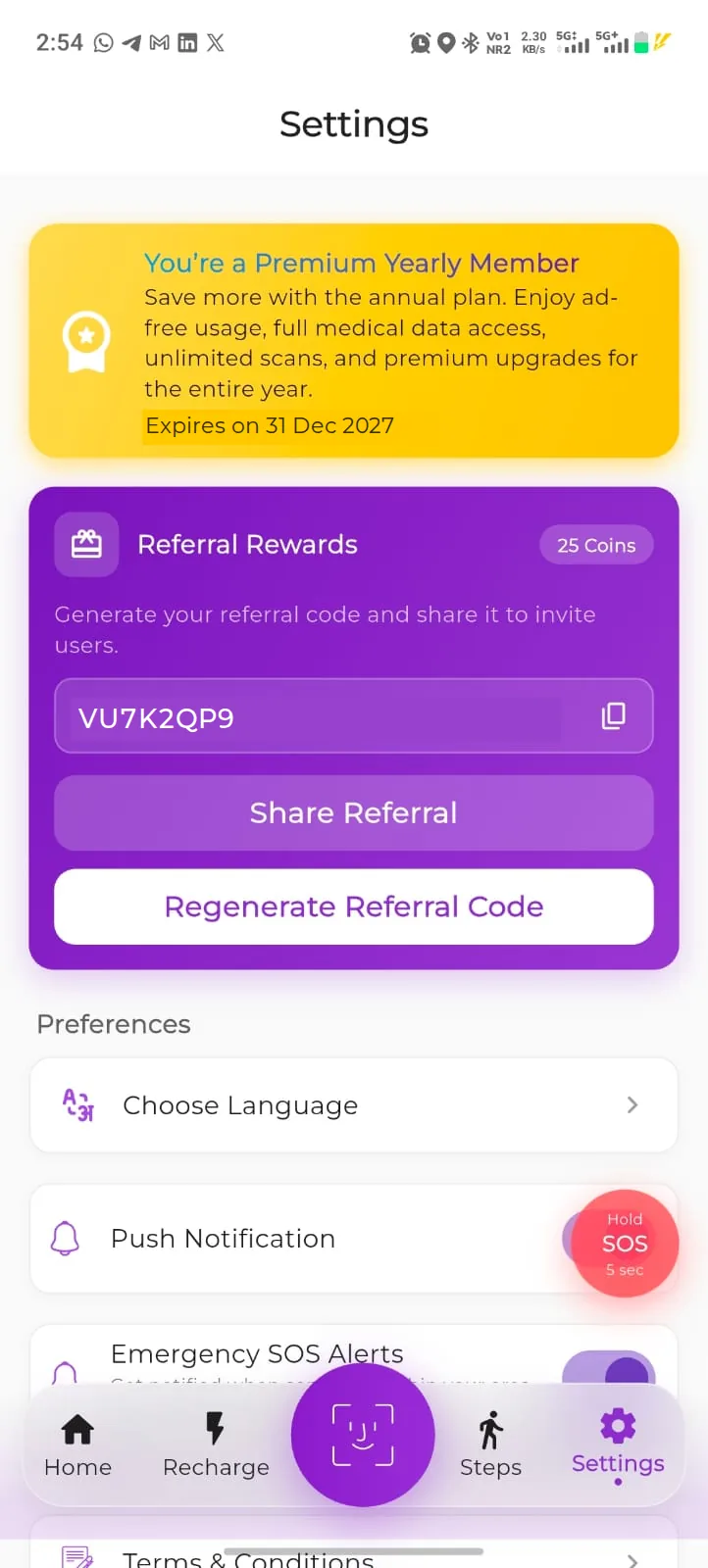
Settings in the app, shown with demo data.
Spend coins on things you already pay for.
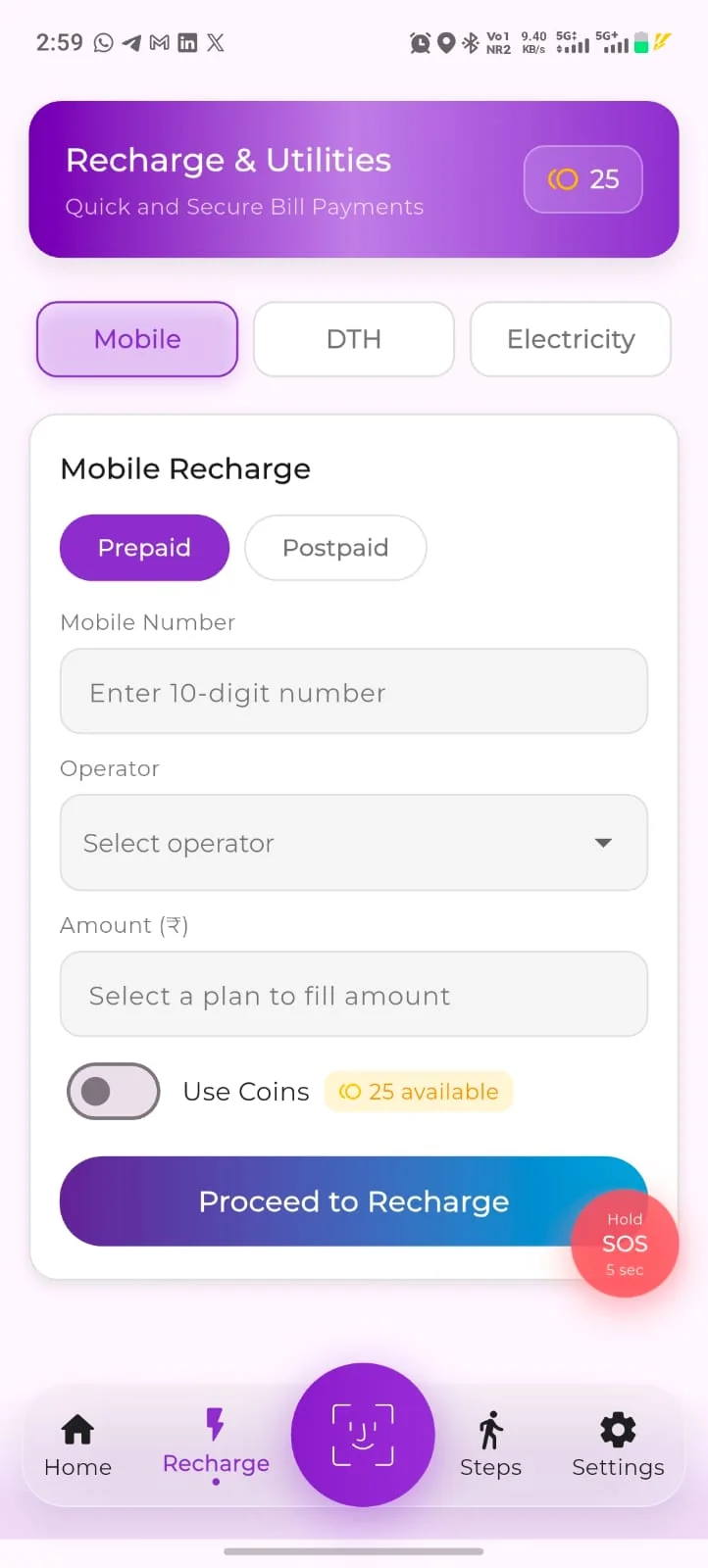
Recharge & Utilities is built into the app. Where a category, biller and amount are eligible on the day you pay, coins can reduce what you pay.
Mobile prepaid
Recharge a prepaid number and apply eligible coins at checkout.
Mobile postpaid
Pay a postpaid bill in the same flow, with the payable amount shown first.
DTH
Top up a DTH connection with the operator and subscriber details you already have.
Electricity
Pay an electricity bill in the same place. Billers depend on your location and app version.
Using coins at checkout
- “Use Coins” toggle. Turn Use Coins on in the payment step to apply your eligible coin balance to that transaction.
- Check eligibility first. Not every operator, plan or amount is eligible. The app confirms eligibility before you pay.
- Limits and payable balance. How many coins can be applied to a single transaction, and the amount still payable after coins, are shown before you confirm. Owner verification
Recharges and bill payments are also subject to the operator’s or biller’s own terms, and to successful payment.
Bring the people you’d want found.
The most useful referral is a parent, a partner or a friend who has nobody listed as an emergency contact yet.
- Your own code. Generate a referral code in Settings, share it from the app, and regenerate it whenever you want a fresh one.
- Qualifying actions. What counts as a completed referral, and any reward for it, are shown in the app at the time you share. Owner verification
- Registration stays free. The person you refer can register without paying anything.
- Open SettingsGo to Settings in the VerifyU app.
- Referral RewardsOpen the Referral Rewards section.
- Generate your codeCreate the referral code linked to your account.
- Share ReferralSend it to the people you want registered — or tap Regenerate Referral Code for a new one.
Referral rewards, where offered, depend on the offer running at the time and on the rewards terms.
Eligible partner offers, where available.
Alongside recharge and utilities, coins may be usable on eligible partner offers where those offers are available to you. Offers differ by location, app version and the campaign running at the time, and they are listed in the app rather than promised here. Owner verification
VerifyU does not publish partner names on this page. Only the offers shown in your app apply to your account.
What counts, and what doesn’t.
Rewards are a daily habit, not a financial product. Here is what that means in practice.
Fourteen eligible days at the current offer would add up to seventy coins. It is an example of the maths, not a balance, a projection or a promise of what you will earn.
VerifyU Coins have no cash value and are not a currency, token or investment. Earning and spending coins is subject to eligibility, limits and the rewards terms.
Built for emergencies.
Useful every day.
Register once. Walk every day. Keep the profile that matters up to date.
I hope I never need this. But I should have it.