How it works
Rewards
About
Get VerifyU — it's free
Safety & emergency

If you could not speak,
who would speak for you?

VerifyU is built safety-first. This page explains every emergency capability in the app, what each one is designed to support — and, just as plainly, what each one depends on.

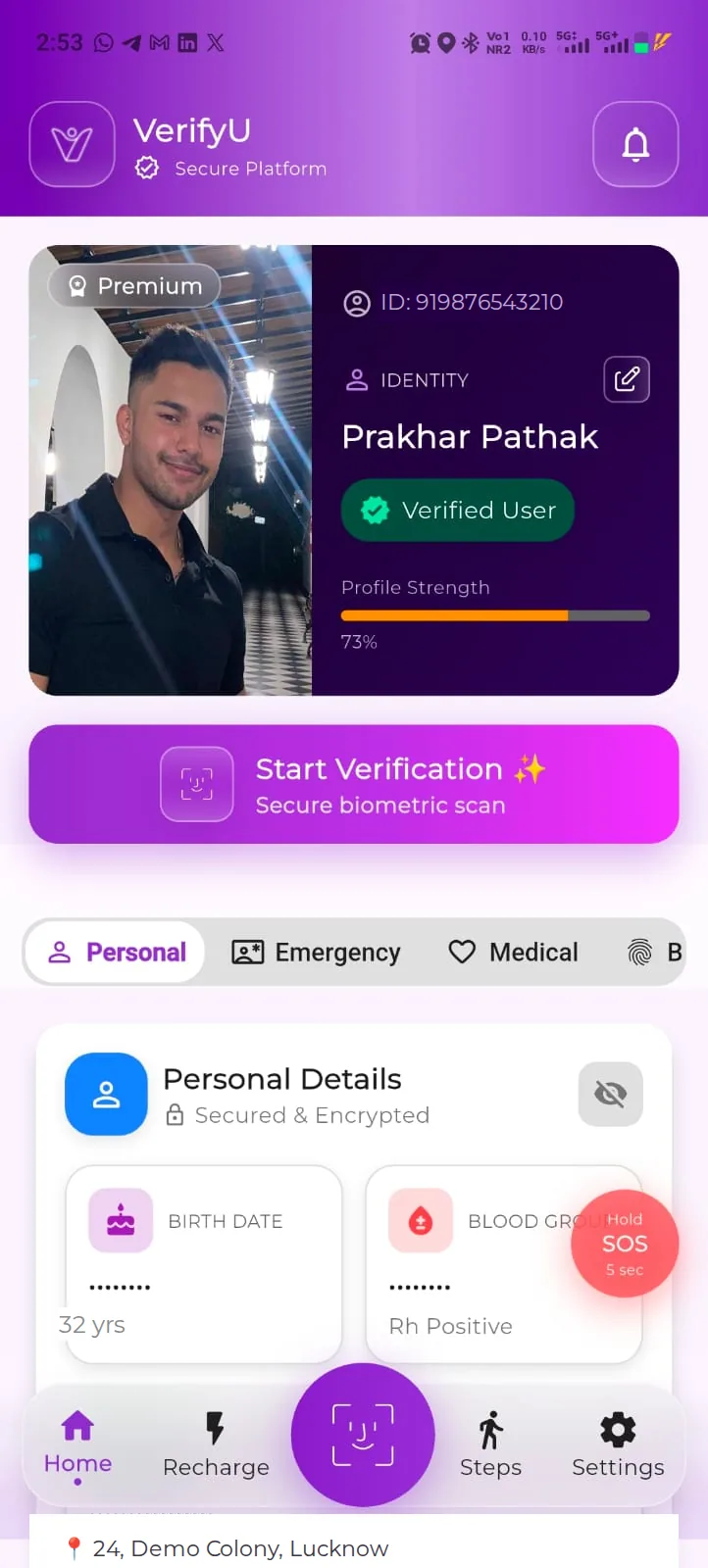
VerifyU identity dashboard with a verified demo profile, Start Verification and the Personal, Emergency, Medical and Biometric tabs
The safety layer

Eight capabilities. One registered profile.

Each of these works from the same registration. None of them is a promise of rescue — they are ways to make identification and contact more likely than they would otherwise be.

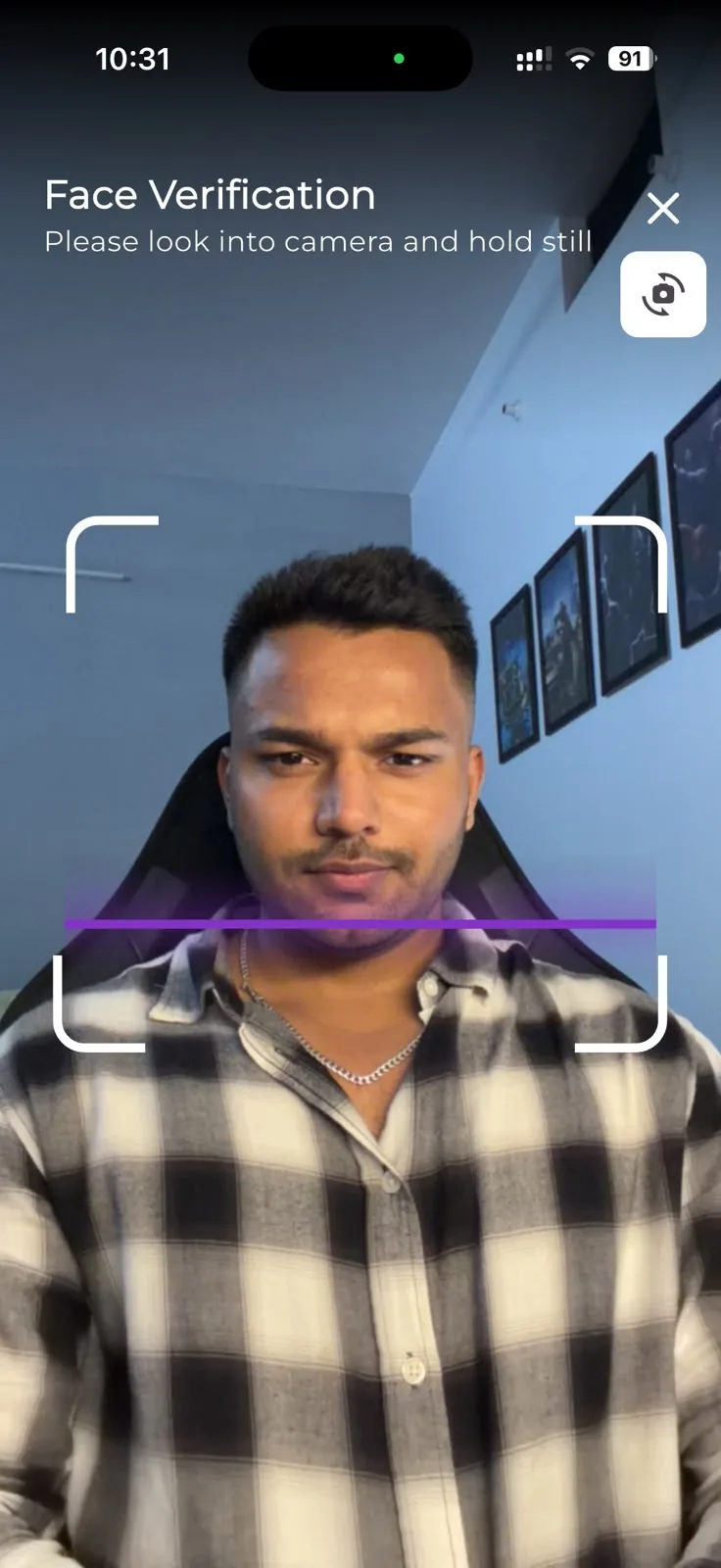
VerifyU face verification camera screen asking the person to look into the camera and hold still
In-app screen, shown with demo data.

Emergency identification

The first question at any serious incident is the hardest one to answer: who is this person, and who should be told?

The problem

An unconscious, injured or disoriented person cannot give a name. Wallets are lost, phones lock themselves, and arrivals get recorded as unidentified while relatives are still waiting to hear something.

What VerifyU supports

A VerifyU user with scanning access can check a face against registered profiles. A match opens a Verified Profile — marked “Scanned securely via VerifyU” — carrying the person’s photo, name, gender and blood group, with Personal, Emergency and Medical tabs behind it.

What it depends on

Prior registration and completed face verification, a suitable image, a working data connection, and the helper having relevant scanning access. Profile access is logged and the registered person is notified in the app.
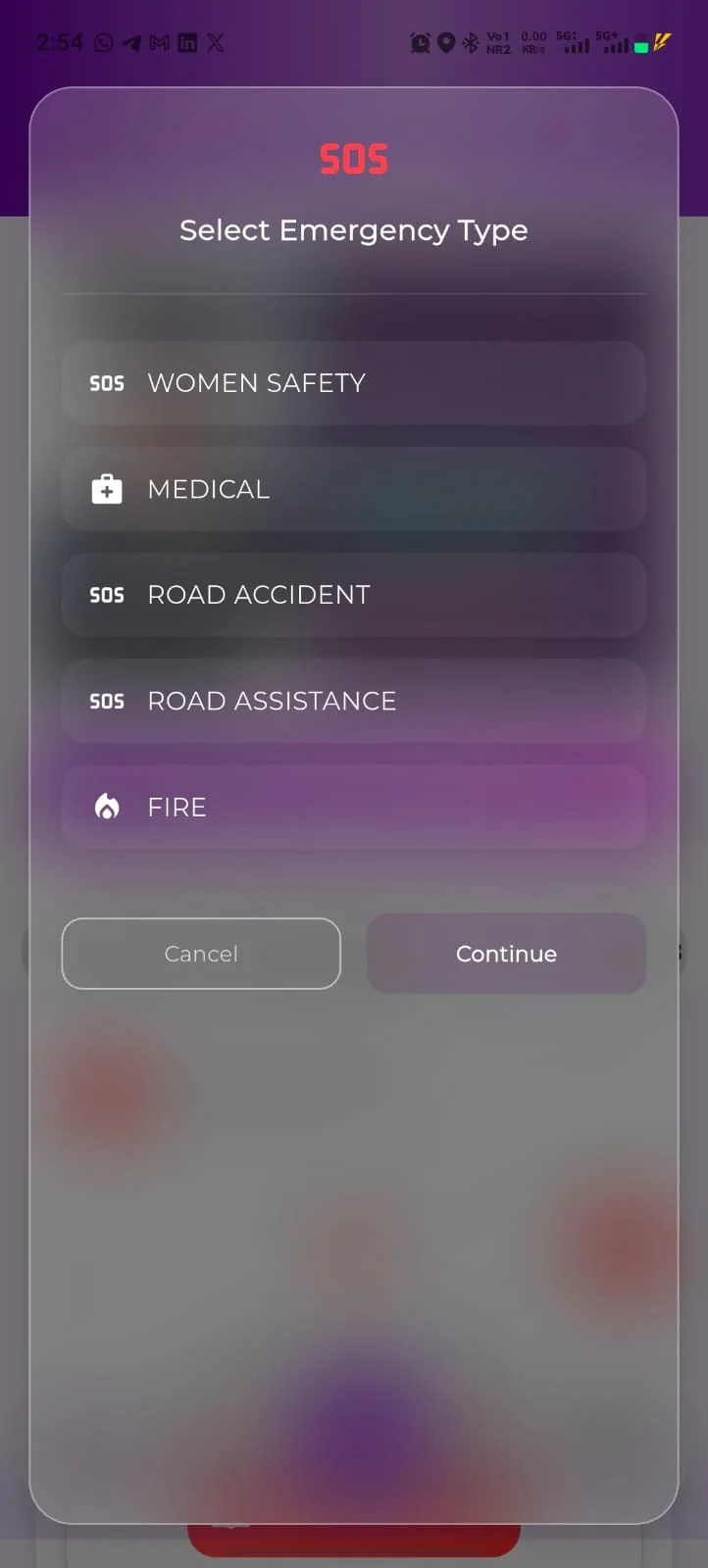
VerifyU SOS screen listing the emergency types: Women Safety, Medical, Road Accident, Road Assistance and Fire
In-app screen, shown with demo data.

General SOS

Sometimes you are conscious, able to hold a phone, and still not able to explain anything calmly. SOS is for that moment.

The problem

In an emergency, most people do not have the composure to explain a situation five times over — to a stranger, to a call handler, and then to every member of their family in turn.

What VerifyU supports

Hold the SOS button for five seconds and the app asks you to select an emergency type, then continues with the in-app alert flow that reaches the emergency contacts on your profile. Emergency SOS Alerts sit with your other preferences in Settings.

Women SafetyMedicalRoad AccidentRoad AssistanceFire
What it depends on

Connectivity, notification and other app permissions, the numbers on your profile being current, and your contacts actually seeing and acting on the alert. VerifyU does not dispatch help.

Women’s safety

Personal-safety situations usually begin long before anyone would dial an emergency number. The first need is to reach someone you trust, quickly and without explanation.

The problem

Feeling unsafe on a route home, in a cab or at an unfamiliar address rarely qualifies as an emergency to anyone else — and by the time it does, typing out an explanation is the last thing you can do.

What VerifyU supports

Women Safety is the first of the five emergency types in SOS, so the alert your emergency contacts receive carries the right context instead of being one more unexplained missed call.

What it depends on

Exactly what a Women Safety alert sends, and whether location is included, is set by the app version and your permissions. Owner verification

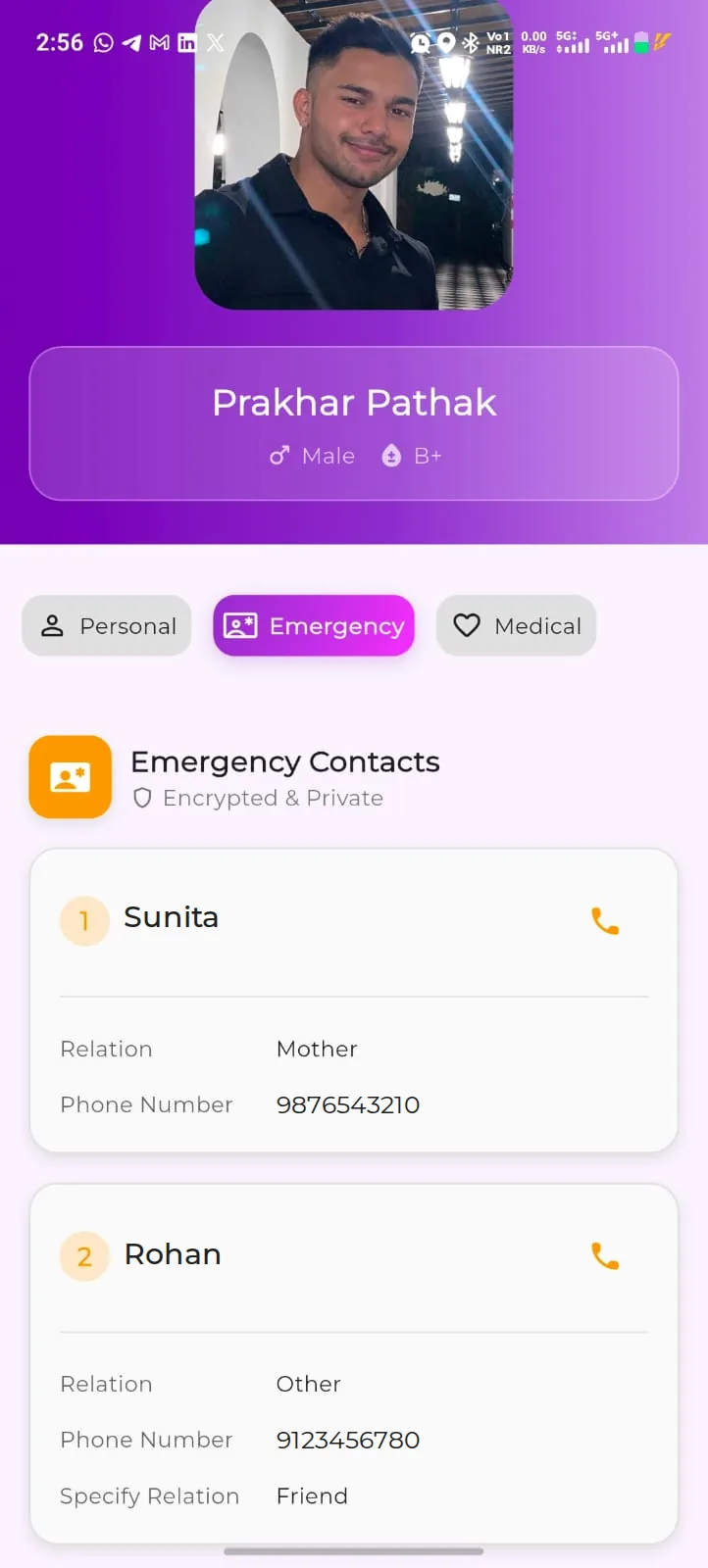
Verified profile Emergency tab listing two emergency contacts with relation, phone number and a call button
In-app screen, shown with demo data.

Emergency contacts

A phone full of numbers is useless to a stranger. Two named people, with their relationship to you, are not.

The problem

Someone helping you has no way to guess which contact matters. Most phones are locked, and even an unlocked one offers four hundred names and no instructions.

What VerifyU supports

Two trusted contacts, each with a name, relation and phone number, are part of registration. They appear on the Emergency tab — labelled “Encrypted & Private” — with a call button beside each one, and they are where your SOS alert is aimed.

What it depends on

Keeping the numbers current, choosing people who tend to answer, and telling them they are listed — so the call is not a surprise on the worst possible day.

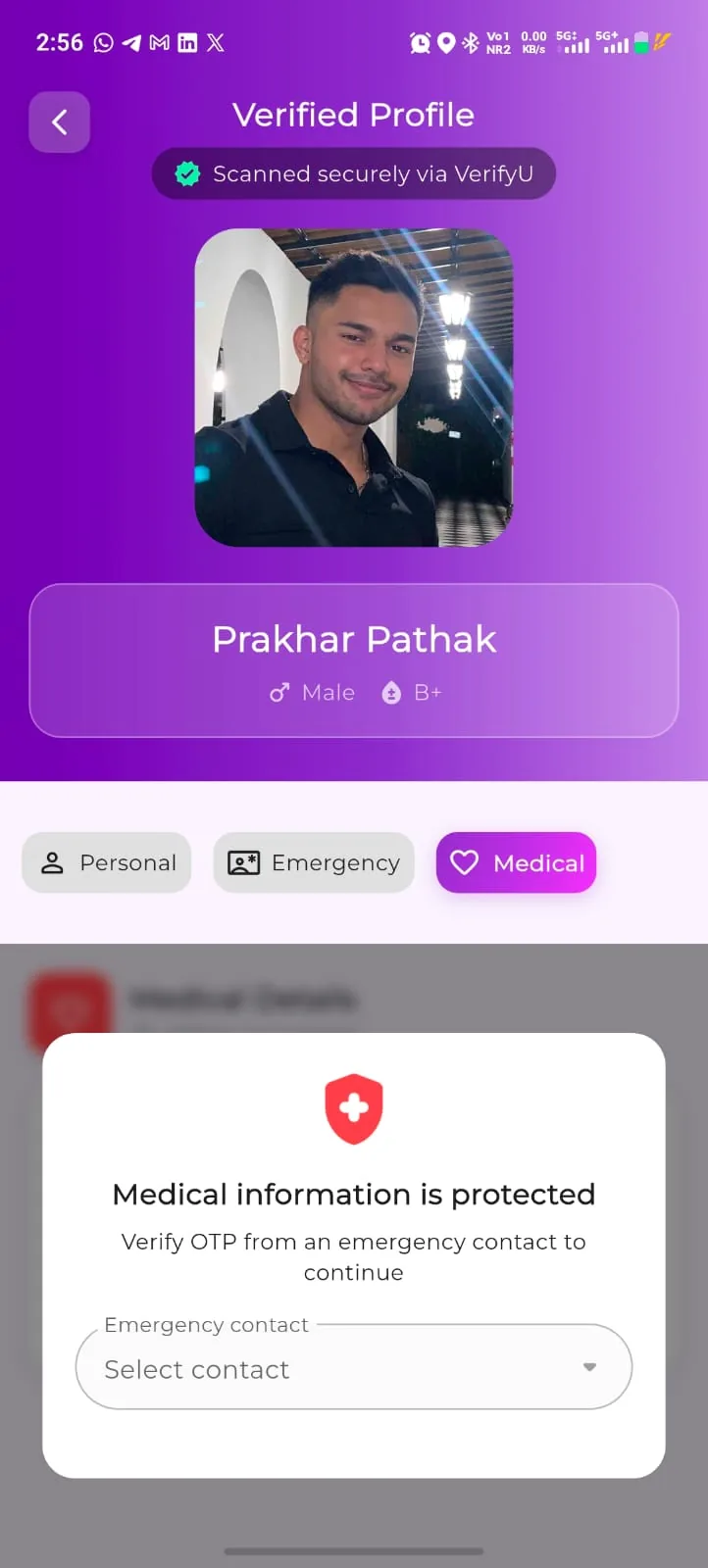
Verified profile Medical tab with a prompt to verify an OTP from an emergency contact before medical information is shown
In-app screen, shown with demo data.

Medical information

Blood group, allergies and current medication matter most in the minutes when you are least able to say them.

The problem

Almost nobody carries medical details. The people who most need them carried — those with conditions, allergies or complex medication — are the least likely to be able to recite them under stress.

What VerifyU supports

Your blood group is shown on the verified-profile header, beside your name and gender. The Medical tab goes further and stays protected: the app asks the helper to verify an OTP sent to one of your emergency contacts before medical information is opened.

What it depends on

What you record and keep accurate, one of your emergency contacts being reachable to pass on the OTP, your plan — full medical data access is part of Premium — and the app version. Clinical decisions always remain with clinicians.

Family and dependants

The people least able to explain who to call are usually children and elderly parents. They are the reason most families register.

The problem

A separated child, or a parent living with memory loss, may not know a phone number, a surname or an address — and cannot be handed an app and asked to register themselves.

What VerifyU supports

Children’s and dependants’ details can be added to your profile during registration, so a dependant’s record carries the adult who should be contacted.

What it depends on

How far a dependant’s record can be looked up by a helper depends on the app version and the access flow in use. Owner verification

Nearby and community response

The first person at the scene is almost never a responder. It is whoever happened to be standing there.

The problem

Bystanders want to help and usually cannot. They do not know who the person is, whether anything is medically relevant, or who to ring — so they wait for someone official to arrive.

What VerifyU supports

VerifyU runs a Safety Champions programme for volunteers and works with partner organisations — communities, campuses, events and residential societies — so more people nearby know what VerifyU is and how a connection gets made.

What it depends on

Participation, and nothing else. It depends on who nearby has registered, who has scanning access, and who is willing to step in. What Safety Champion onboarding and verification involve is defined by the programme. Owner verification

Hospital integration

Emergency departments lose real time on unidentified arrivals — time spent searching pockets instead of treating a patient.

VerifyU for hospitals
The problem

An unidentified arrival means no history, no blood group, no consent conversation and no family in the corridor. Everything about that first hour is harder.

What VerifyU supports

Where an institutional arrangement exists, an emergency team can use VerifyU to look for a registered identity, view the emergency information a patient chose to share, and contact next of kin within the permitted workflow.

What it depends on

An arrangement being in place with the institution, staff having relevant access, connectivity, and the patient having registered beforehand. Owner verification

After a match

You still know what happened to your profile.

Identification is only acceptable if the person being identified keeps visibility and control.

You are notified

VerifyU sends an in-app alert to the registered user when their profile is accessed.

Access is logged

Scans are logged. Logs are described on verifyu.in as including the time, IP address and location of the scan. Owner verification

Emergency-relevant first

A match opens a verified profile with photo, name, gender and blood group. Medical information stays protected behind an OTP sent to one of your emergency contacts.

Read this part

What VerifyU is not.

A safety product that oversells itself is dangerous. These are the limits, in plain words.

  • Not an emergency service. Call your local emergency number first, every time. VerifyU does not dispatch ambulances, police or fire services.
  • Not guaranteed identification. A match depends on prior registration, image suitability, connectivity and access. It can fail, and sometimes it will.
  • No guaranteed assistance or response time. Nothing in the app obliges anyone — a bystander, a contact or an institution — to act, or to act quickly.
  • Not a continuous location-tracking service. VerifyU is built around emergency identification and alerting, not around following where you are. Owner verification
  • Not a medical record system. The medical information in your profile is what you chose to record for an emergency — it is not a clinical history, and clinical judgement stays with clinicians.
  • Not money. VerifyU Coins are a reward inside the app. They have no cash value and are not a currency or an investment.

VerifyU supports identification and communication. Feature availability depends on the app version, plan, permissions and applicable terms.

Get VerifyU

The safest version of this
is the one you set up early.

Register yourself. Register your parents. Register the people who could not explain themselves.

I hope I never need this. But I should have it.

VerifyU identity dashboard with a verified demo profile